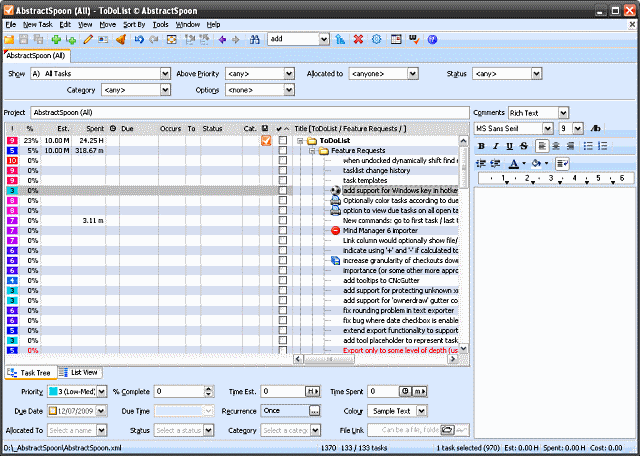

Almost every computer user relies on a todo list of some form or other. Whether it is a calendar detailing important business meetings or a list of hospital appointments and dinner dates, your computer can be used to ensure that you never forget an important date or time. But the problem with most todo apps is the fact that they are tied to the computer on which they are installed, but this is not the case with ToDoList Portable.
The app can be installed on a USB drive and used on any computer without the need for reinstallation – although it is also possible to install the software on your desktop or laptop in the usual way. Depending on how you decide to use ToDoList Portable, you can opt to store program settings in the registry or in .ini files.
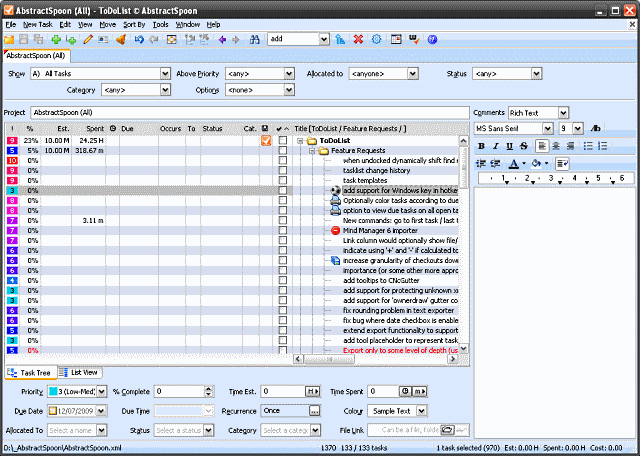
To make it easy to sort, arrange and find your data, the program includes a huge number of columns that can be used to house various kinds of information. Not all of these will be needed, but it is certainly good to have a range of options available when it comes to categorizing your data. Despite its minuscule size and portability, this is a surprisingly advanced tool and one that should not be overlooked.
This all good todo managers, ToDoList Portable not only allows for the creation of tasks and sub-tasks, but there is no limit on the number of sub-tasks that can be created or the depth to which tasks sub-lists can go. With support for due dates, priorities, task delegation and sharing, and advanced import and export options, this is a seriously powerful time management tool that simply must be tried out.
Verdict:
With a powerful set of features that puts many big name todo list managers to shame, ToDoList Portable is a surprisingly well developed portable app that can help your to manage your projects.
(1)
Office & Business
Specifications
Requirements
Changelog
Version 9.2.11 (see changelog for more info):
Fixed auto-refiltering of ‘Find Tasks’ filters
Fixed ‘Html Comments > Insert > Link…’
Deal of the Day
-57%
Windows 11 Home
Offer Ends In: