
SoftPerfect Network Scanner is a powerful, portable tool that can help manage, troubleshoot and check the security of any network.
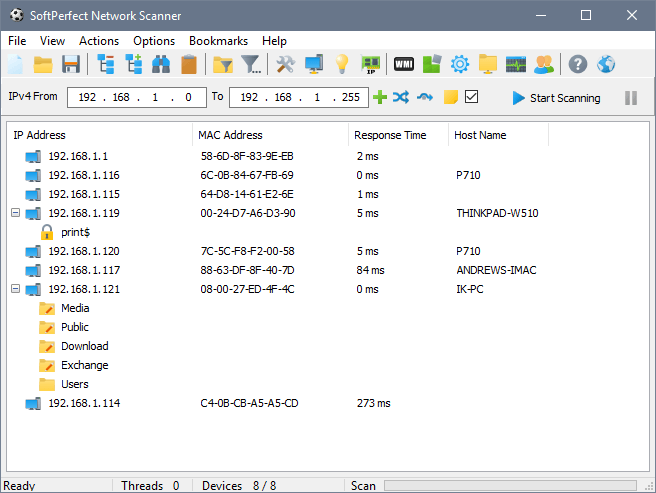
Just give the program an IP address range, click the Start Scanning button, and it’ll use ICMP, NetBIOS and SNMP to check everything that’s currently connected to the network: PCs, laptops, router, network printer, anything that has its own IP address.
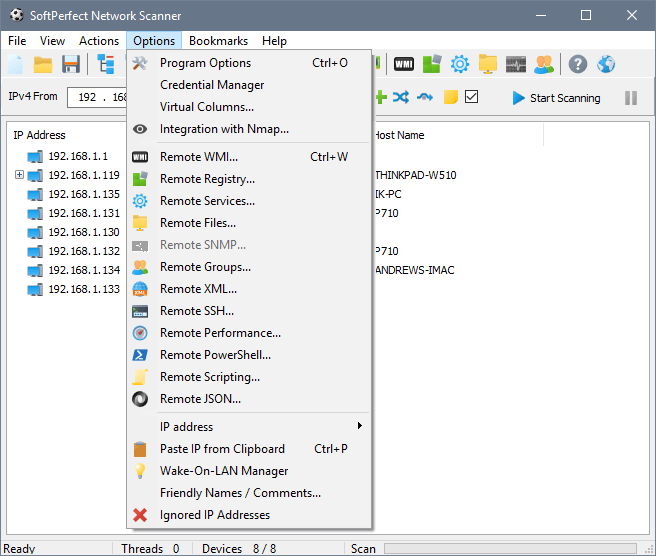
At a minimum you’ll get a list of each connected device, including its network name, MAC and IP address. And you can then manage PCs or laptops from here, perhaps sending a message to the currently logged-on user, shutting down the system remotely, or sending a Wake-On-LAN message to start a system that’s currently turned off.
Even better, SoftPerfect Network Scanner will also detect and display resources that are shared on the network (both administrative and hidden), so you can easily check that all your networked systems are properly configured. And if you spot something that looks out of place then double-clicking it will open the share in Explorer, a quick way to find out exactly what’s being exposed.
The program is multi-threaded for maximum performance, highly configurable, and provides many other ways to remotely administer networked PCs. You may be able to find out more about their services, access Registry information, even send WMI queries, although you’ll need some WQL (WMI Query Language) knowledge to get the most from this.
Verdict:
A powerful, portable and easy-to-use network scanner that’s packed with useful features
(6)
Networking Tools

Specifications
Requirements
Changelog
Version 26.9 brings (see changelog for more):
Added: Banner grabber with wider protocol support.
Added: DHCP options display and INFORM message support.
Improved: Cleaner, more intuitive UI with better localisation.
Improved: Smarter search, filtering and comparison with highlights.
Improved: Faster port and MAC vendor lookups without downloads.