
Homedale is a portable free tool which detects nearby wireless access points, displays their details, and plots signal strength over time.
Launch the program and its “Access Points” tab provides an in-depth report on your network neighbours, including their name, MAC address, vendor, signal strength, encryption, country ID, mode, frequency, band, first and last seen times, supported bitrates, model and adapter. A convenient right-click menu allows you to connect to (or disconnect from) any particular access point.
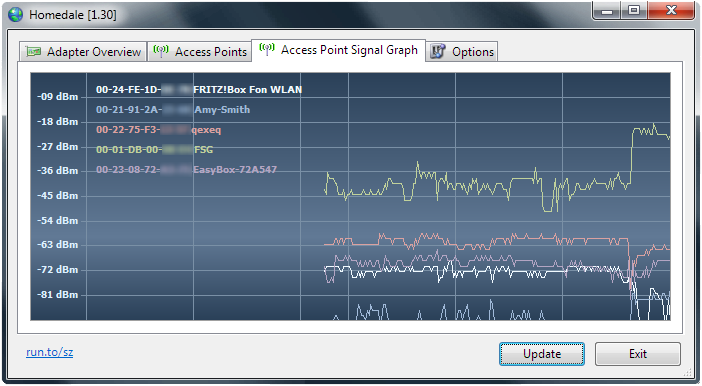
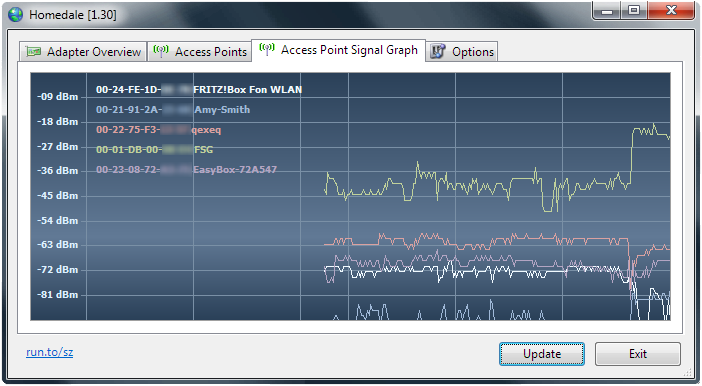
An “Access Point Signal Graph” page plots signal strength over time. Run Homedale on a laptop and you’ll be able to access connection quality in various locations. Right-clicking the graph displays options to save it as an image, or log the signal strength data to a text file.
A “Location” tab uses Google Geolocation and Mozilla Location Service to locate your current position on a map. Not exactly essential, but worth trying once, just to see if it works. (For us: Google did, Mozilla didn’t.)
Homedale also has one or two useful configuration options. For example, by default it removes access points once they’ve disappeared for 1 minute, so you’re only ever seeing active networks. Tell Homedale to never remove them and the report will list every detected network, whether it’s currently active or not.
Verdict:
A simple and straightforward wifi monitor with just enough features to be useful
Operating Systems:
The SZ
Free
951.00 KB
Specifications
Changelog
Deal of the Day
-88%
AVG Secure VPN 2026 [10-D, 1-YR]
Offer Ends In: