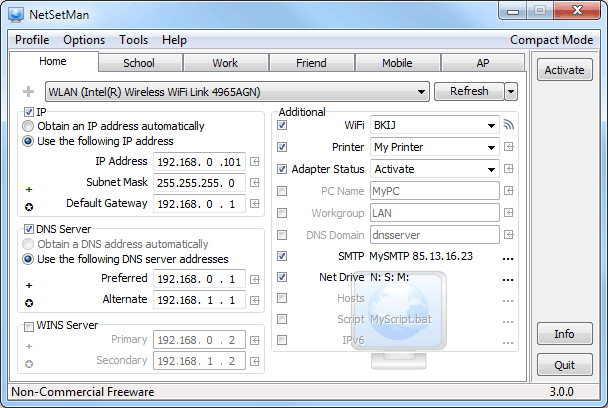

NetSetMan is a straightforward network settings manager that makes it quick and easy to configure your laptop for home, college, and other frequently-visited networks.
The program works by creating profiles for each network you use, up to a maximum of six. These profiles can define your IP address, DNS server, computer name, workgroup, default printer, network drive mappings, host file entries, and more.
Not enough? You can also configure scripts to run whenever you select a particular profile, and these could run programs, stop and start services, tweak Registry settings, do almost anything you like.
And then, when you revisit a network, there’s no longer any need to manually adjust all your settings. Simply choose the appropriate profile and NetSetMan will change everything for you automatically, and in just a few seconds.
This version is free, but for personal, non-commercial use only. If you want to use it at work then you’ll need to purchase the Pro version, which also includes a few extras. You’re able to set up an unlimited number of profiles, and these can additionally include your network domain, proxy settings and browser home page (IE and Firefox).
Verdict:
If you regularly access a number of different networks then NetSetMan could save you a great deal of time
(1)
Networking Tools

Specifications
Changelog
Version 5.3.2 brings a host of improvements (see full changelog), including:
– Fix: Connecting net drives with user name and password failed
– Fix: Connecting to WiFi network by MAC address
– Fix: Saving a WiFi profile without encryption
– Fix: Settings in a profile without a selected NIC were not saved
– Fix: Incorrect tray icon animation after command line activation
– Fix: High-DPI issues with checkboxes
– Fix (Pro): Firefox profile file might not have been found
– Command line activation now updates the active profile in an
already running instance of the application
– Tray-Info now marks network adapters that are disconnected
– Minor fixes and adjustments