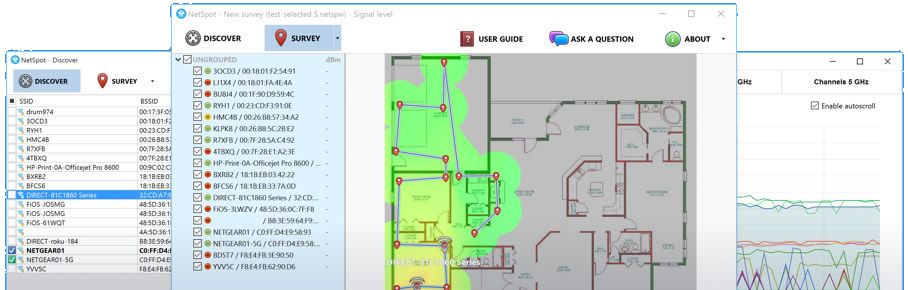

NetSpot is a free tool for discovering local wireless devices and creating colour-coded heatmaps.
Launch the program and it immediately detects all your local wifi devices, displaying their details in a table: SSID, BSSOD, Signal (current/ min/ max/ average), band, level, width, vendor, security, mode, and when it was last seen.
Clicking any column header sorts by that field. For example, clicking “Channel” groups devices by their channel, helping you spot competition and conflicts.
This isn’t just about static figures. NetSpot displays tiny signal graphs within the table, and double-clicking any device shows graphs and tables of its signal over time, along with other interesting details (when and if the channel and security were last changed).
There’s also a separate Survey mode which enables collecting and displaying wifi data on custom maps.
Verdict:
A good-looking, powerful yet easy-to-use wifi discovery tool.
Operating Systems:
NetSpot Team
Free
1.00 MB

Specifications
Changelog
What’s new in 5.1.0.707 (see changelog for more):
– added Add building elements made of custom materials when creating a layout for your Planning survey
– added Add racks (shelving units) in Planning surveys
– added A selection of colors for layout creation for a better visual representation of building elements made of different materials
– added You can now use a ruler tool for an easier verification of lengths and distances while creating a layout in Planning mode
– added You can now export a floor layout you have created in Planning mode into an image file that you can then use for surveying an existing networ
– improved An even better floor plan creation interface
– improved Subtle improvements in the app’s interactivity
– improved Project information window has been redesigned to offer extensive data in a comprehensive view
– fixed Lots of minor fixes for an enhanced usability and stability
Deal of the Day
-78%
Avast SecureLine VPN 2026 [10-D, 1-YR]
Offer Ends In: