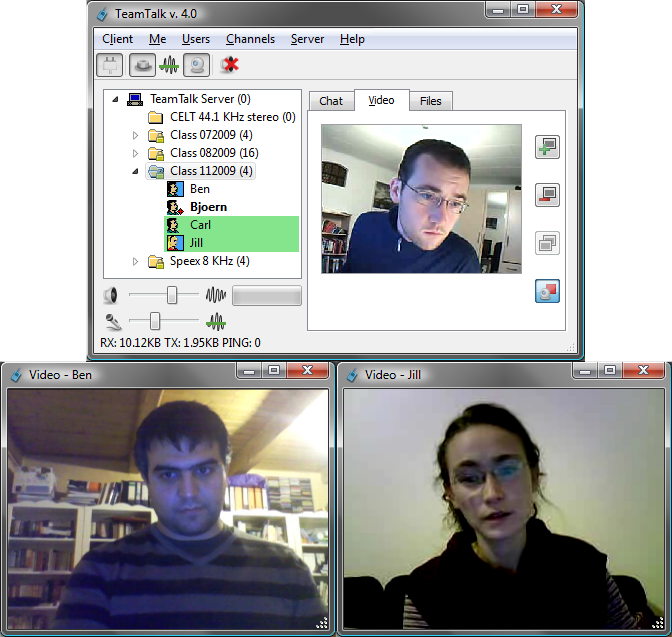

Instant messaging tools are very useful for keeping in touch with friends and family, and the likes of Skype have also found their way into the workplace. The ability to communicate with colleagues and contacts around the world can be a great productivity boost and a massive help to business. TeamTalk is a free conferencing system which includes a chat component to it, but there is a great deal more to be found as well.
As you would expect of any communication tool you can use TeamTalk to send text based messages to other users, and there is also the option of using a web cam and microphone to conduct video and voice chats. Unlike other chat tools, TeamTalk includes the option of recording conversations so you can play them back at a later time. In corporate environments, the program can be used on used on a LAN to keep workers connected to each other, but it can also be used over the web to connect to people further afield.
But this is not just a program about chatting. It can also be used to share files, but more than this, it can also be used to share applications for the purposes of collaborative work or giving online demonstrations to large groups of people. There are no limitations on which applications can be shared in this way and anyone hosting a conference call is afforded full control over sessions. You’ll also find helpful accessibility options that make the program easier for those with visual problems to use.
When installing the software you can choose between setting it up as a client, server, or both. For the greatest flexibility, it makes sense to install it in both client and server mode as this means that the program will be ready to use no matter how you decide to work with it. This is a great alternative to the likes of Skype and the accessibility options open it up to an even wider audience who can then take advantage of this handy means of communication.
Verdict:
Not the best looking program available, but one that gets the job done and goes far beyond the capabilities of many other comparable tools.
(1)
Office & Business

Specifications
Changelog
What’s new in 5.20 (see changelog for more)?
– Fixed echo canceller being less effective over long duration
– Recording to single file now applies user specific volume settings
– Status event on channel join is no longer displayed twice
– Added Ukrainian language
– “On”/”Off” instead of “0”/”1″ when subscription changes
– Alert when intercepted from another channel
– Fixed tt:// URL decoding for percent (%) characters
– Change default sound events playback mode to “one by one”
– Decrease server lost sound volume
– Don’t join previous joined channel if connection is dropped when not in a channel
Deal of the Day
-24%
MAGIX Music Maker Plus 2020
Feature packed, accessible music creation studio